I've finally updated my portfolio with recent work from indie games and other stuff. If you get a chance please have a look, and let me know what you think.
http://www.causticphoton.com
Thanks!

Wednesday, November 20, 2013

Wednesday, October 16, 2013
Creating an Effective Video Trailer for an Action Game
Greetings,
My last post probably came off a little bit
walden-pond-hippie for some, this time I'll be staying more in the physical realm. :)
Several weeks ago my friends at DigitalDNA Games needed a video trailer for CastleminerZ, an FPS/Survival game set in a block-based world. Having done many trailers, I offered to help them out. The game was officially "greenlit" by Steam today, congrats guys!
Let's take a quick
inventory of the tools:
- Adobe Premiere - Video Editing
- Adobe Photoshop - Stills & Masks
- Autodesk 3ds Max - Animated titles
- Adobe Media Encoder - Final Compression & h.264 output
For moving titles (text), Adobe
After Effects obviously works great too. I just find it's easier to me to get
what I want from Max, mostly because I've been using the software for like 25
years.
For this project I decided on HDVI 720p 29.97fps
as the working resolution. 1080p is awesome, but it's a diminishing margin on
return given the additional strain on your system during editing and time in
compression stage.
A dual-monitor setup is essential for editing in
Premiere; I put most secondary palettes on the 2nd monitor, reserving
the maximum amount of space on the 1st monitor for the timeline.
 |
| Dual-monitor Layout in Adobe Premiere |
Getting Started:
What's the Structure?
From a visual design perspective, we're creating a fairly standard action trailer that combines captured clips of game
play with messaging that communicates the intended experience to the player.
But for me it's not enough to throw a bunch of
random game clips together and call it a day. I think good trailers have a
visual progression and cadence that keeps the viewer interested through the
entire video. This is where you put on your marketing hat, and ask yourself
what emotional beats or features will resonate with your target audience.
After playing a fair amount of CastleminerZ, I
felt like the core of the game was about survival, adapting to the harsh
conditions of the world, and exploring the rich resources that lie beyond the
starting zone.
So the meat of the structure becomes 3 sections; Survive,
Adapt, and Explore.
The target length of the video should be around a
minute or less. Through experience I've found this is about the average
attention span before things feel redundant. You want to tell enough of a story
to get people interested, without over-saturating or repeating the messages.
Game Capture: Makes
or Breaks Your Video
It really can't be stressed enough... spend
sufficient time on getting good, high-quality, high framerate video capture of
your game being played.
Sometimes people rush this step, and end up in an
editing session running out of compelling clips, or not having enough variety
to make the video interesting. Always better to have too much, vs. too little.
Fortunately the folks at Digital DNA have a high
quality capture system, so they scheduled a multiplayer session and we captured
well over an hour of video clips.
Directing a capture session can be easy or
hard depending on the game. In our case it involved playing as many of the
world areas (biomes) as possible, different times of day, combat with all
possible enemies, etc. to create the desired variety.
If you’re doing capture for a game that hasn’t
been released yet, you can run into issues. Like the game isn’t fully polished
yet, or performance & frame rate are subpar. This adds a level of difficulty
to the capture process, and may require you to be selective about what you show. I've been in that situation many times, but this time we were in really good shape.
A fly-cam in your game engine is an invaluable
asset for you to capture cinematic shots. These shots add world context, and help
make the game appear more epic.
Try to keep your raw capture clips short. For example a 2-hour
clip is a massive file, and very cumbersome to work with. Consider shorter captures (10-15 minutes or less),
so you can easily label & index them.
 |
| Raw Capture Clips Are Ready to Go! |
Culling Out the Best
Clips: Grab a Cup of Jo and Get Comfy
Finding the best clips to use for your video is
the most time consuming part of this whole process. 90+% of your capture
footage is worthless, you need to watch ALL the capture footage carefully to
find those brief gold moments of glory.
The way I do this is to drag the raw capture
clip into Premiere’s timeline, hit PLAY and start watching. As soon as I see
something cool, I cut it out using the razor tool, and put it off to the side. I
leave a little leader on either end of the clip for context, and know that I
will ultimately trim it down to the core moment.
Then, resume playback of the capture footage. Once
you’ve done this for each capture clip, you should have a large number of
extracted clips ready to assemble into your edit.
 |
| Culling Out The Good Stuff |
Titles: KISS Principle
Applies
I usually don’t like wordy action videos, and really
try to boil messaging down to the most succinct form. Then, I need to apply a
treatment so they visually pop. A subtle approach is to use motion,
movie-trailer style, to make your text slowly scale, and appear to moving closer
or farther from the viewer.
But for this video I wanted more zazz. I came up with
an X-files inspired treatment showing a bright light blasting through cut-out
text. This kind of thing has been done a million times, but it’s usually
effective if done right.
And while I originally gave the effect a blue
color, I later decided that since this was a “greenlight” trailer the text
should be green (ha!). It also just fit better with the game footage from a
color scheme standpoint. An easy hue adjustment in Premiere does the trick.
In 3ds Max, I chose my font, and created text
splines. Then, I extruded them into a 3d model. I kept all my modifier stacks
intact so I could easily go back and change text, font, etc. as needed. A large
tesselated wall was modeled, and the text model was used as a boolean operator
to cut the shapes through the wall.
A target spotlight was placed behind the wall, this is the basis for the “rays” that spray through the cut-out text holes. The actual "foggy rays" effect comes from adding a volumetric effect to the light. Then you can set the light & fog colors, and use light attenuation to limit the length of the rays.
A lens flare effect was also added to the light to create the bright white core. This is often a lot faster/cheaper than making a true volumetric light core, and you get nice secondaries from it as a bonus.
A lens flare effect was also added to the light to create the bright white core. This is often a lot faster/cheaper than making a true volumetric light core, and you get nice secondaries from it as a bonus.
 |
| Creating a Volumetric Light Effect in 3ds Max |
For the motion, the light was set up to move from
left to right, from one edge of the word to the other. This gives a nice crossing effect, as the rays
offset the light direction. Lastly I add a camera directly facing the wall to center the text in frame. Trucking the camera slowly towards the wall adds another element of motion.
The clip length was set to two seconds to accomodate fades, but later sped up in Premiere to fit the edit pacing.
The clip length was set to two seconds to accomodate fades, but later sped up in Premiere to fit the edit pacing.
These text treatments were rendered out from 3ds Max to video clips
for use in Premiere. Here is the raw output from 3ds Max, Blogger will brutalize the compression on this, so please ignore the artifacts:
Assembling Your
Edit: The Really Fun Part
Ok, finally I have all this great game capture, titles &
logos. For the most part, the laborious work is over. Let’s revisit our
video structure and break it down a little more:
1 – Company logo
2 – Setup Clips (co-op
crew forming up & heading out)
3 – First Title (Survive)
4 – Action Clips
part A (players getting swarmed by threats, mad combat)
5 - Second Title (Adapt)
6 – Action Clips
part B (players adapting to a variety of threats)
7 – Third
Title (Explore)
8 – Action Clips
part C (variety of scenic vistas and activities)
9 – Game Logo Fly-in
10 – Game URL
I comp’d my logo treatments together in Premiere,
using the built-in effects to add some uniqueness.
Laying out all the clips Premiere’s timeline, I
use A & B tracks so I can keep things more organized visually, and cross-fade
between clips if necessary. I mostly like hard cuts on the action clips, but with
titles I like to see them flow into the appropriate section to keep them
visually connected. A quick fade-to-black often helps to separate the end of one
section and the beginning of the next.
 |
| The Final Edit in Adobe Premiere's Timeline Window |
Tightening Things
Up: Remove the Cruft!
Once an initial edit is assembled, I do a lot of
previewing to get a sense of the pace and cadence. Often I'm well over on
time at this point, there’s usually just too much fat.
So I do a pass where I
tighten up all the clips to their shortest possible length while not losing key visuals. I also brutally scrutinize each clip and remove those that don’t
hit on all cylinders (unless I’m really short on material).
Synchronizing to music is key to building a fun
cadence. I will slide the start points of clips slightly to hit on the music
beats wherever possible. This adds a lot of subtle impact. In this case I had a
wonderful piece of orchestral licensed music that helped frame the game in an
epic way. The most important parts of the music are the beginning and ending,
these are like the bookends of your story.
I try to keep the sound effects from the game
clips as they add to the richness of the audio mix, and help keep you from
feeling detached from the game. Remember to turn off game music though! It
obviously conflicts with your video soundtrack. A little tweaking in the audio mixer will help set relative levels.
When I have a tight edit I like, I take a break.
Walk away from the edit and do something else for a while. I do this because at
this point I’ve become emotionally attached to my work, and may be overlooking
problems or things that aren’t quite working. Some time away helps reset my
perception so when I come back with fresh eyes it’s easier to identify and fix
those little things.
Now I can send an edit to the developer for their
feedback and (hopefully) approval.
Time To Export: Woohoo!
The final step is to use Adobe Media Encoder (now
just “File/Export/Media” in Premiere) to compress the final product. If this is
going up to Youtube, I render out fairly high quality since Youtube will
re-compress the video anyway for different stream types. Going into that
process with a lower quality video will result in too many unpleasant
artifacts.
Typically I choose h.264 compression for video,
and AAC for audio. These seem to be the most widely acceptable, and frankly few
other codecs come close in terms of performance vs. quality.
Here’s a shot from AME showing my settings on
this video:
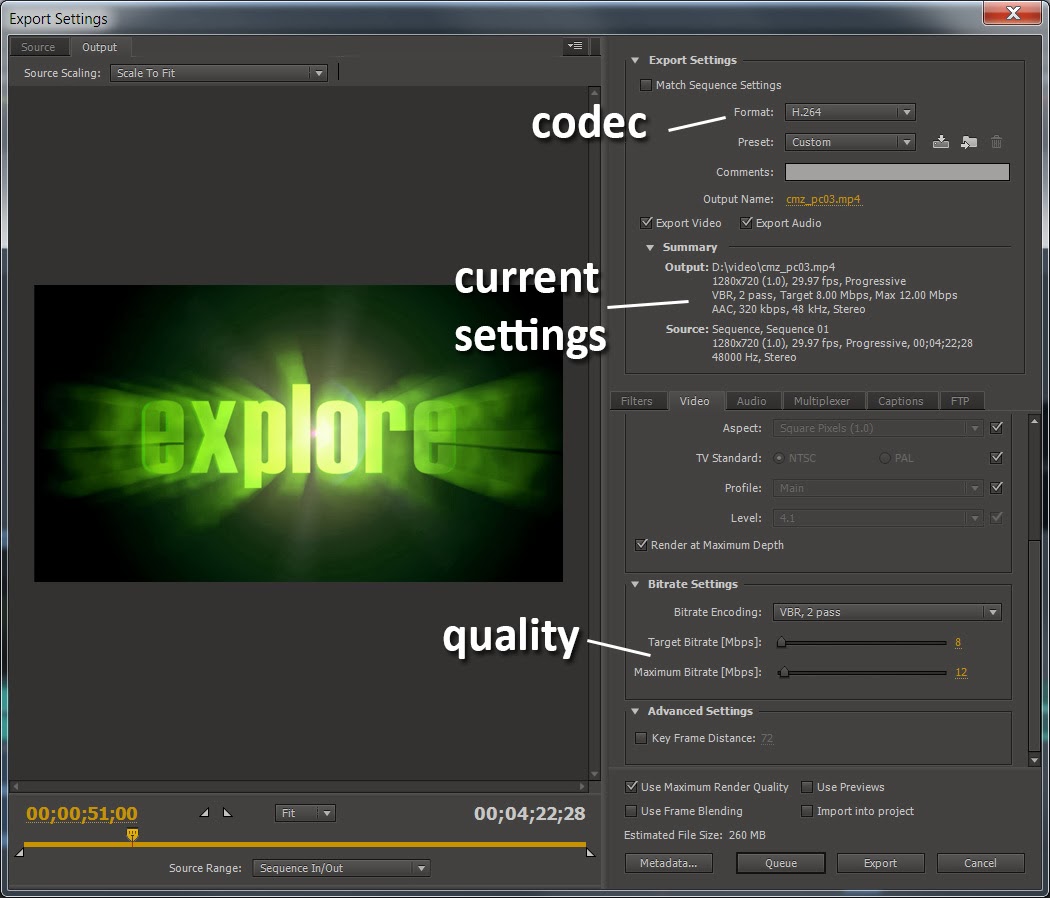 |
| Final Output Settings for Video Compression |
Final Output
Below is a link to the finished product. The overall project took about 8 hours to complete (not including capture). I would embed the video, but it won't show up on Blogger's youtube search (which is particularly brain dead, and it won't accept a direct URL!):
That’s it! Hope this was informative or useful
for some folks. Naturally there's a ton more I could have done to sweeten this, but overall I think it was pretty clean and effective, and helped drive interest to the game.
Wednesday, September 25, 2013
Don't starve your systems of perception, you kinda need them.

This is a post about art process, although it may not seem like it.
As human beings we are remarkably engineered for survival. Our bodies are bristling with systems designed to perceive every motion, sound, and possible threat around us. Our biology is constantly and acutely feeding us beneficial data.
For example, the hundreds of muscles that create expression in the human face are translated by our eyes & mind into hundreds of discreet and specific emotions, inferences, and messages, from subtle to overt.
Despite this brilliantly designed machinery, we as a species are rapidly shaping our lives to ignore or greatly under-utilize it.
Much has been written about the societal impact of phones & mobile computers. No doubt we get some amazing benefits from these devices.
But for my purposes they are a lens through which humans view the world, often diverting the eye away from human-to-human contact. As our obsession with them grows, there are a lot of negative implications, the most egregious being the reduction of face-to-face connections between people.
And it's not just a matter of simple distraction. A side effect of device obsessions is that people can outsource (or offload) their basic perception systems onto other people.
For example, while commuting by rail I often witness a good number of people who move through trains & stations without ever looking away from their phones. They literally use other people as bumpers, guiding them where to walk and when. Often this is accompanied by the use of ear buds or headphones, sealing off sound as well.
From a safety standpoint, there's probably a dozen ways someone can die doing this. But they trust that other people are actually looking for them by proxy, and hence they can focus their attention on e-mail.
The crowd becomes the unwilling navigation & safety vendor to the phone-obsessed client. Once the client/vendor balance tips, I can imagine whole crowds of people just obliviously walking out onto the tracks by accident.
Sitting in traffic, one can't help but notice the endless lines of dark SUV's with nearly-opaque black tinted windows. In this example, people are removing their visibility from the outside world. Their vehicle becomes another one-way lens, other drivers can't see their eyes to judge their awareness.
So what's really being lost here, and how does this apply to art?
When artists aren't creating art, they're on "input" mode. This means absorbing and observing everything around them, drawing inspiration that directly feeds the soul. This input is visual and emotional, we take all of this data and process it in our minds, re-interpreting it into what becomes our artistic output.
Artists rely on our perception systems to feed this important cycle. We need this pipeline to be unrestricted and wide open. There's no way we can outsource this process to someone else.
When we look at the world through these lenses, we lose a critical capacity of our wiring; face-to-face communication and understanding. We lose awareness, emotion, intent, inference, and bonds. We drink the world in through a tiny straw, subverting the immense energy we normally enjoy from our perception systems.
Our soul doesn't get what it needs. It becomes idle and anxious. Most distressingly, it doesn't reliably feed the output process when called upon, because we didn't fill the well. Generally, anything dehumanizing should be viewed as potentially toxic.
So what should we do?
I think we can work to be better bi-directional communicators, turning off our phones for a time every day, and going out into the world to interact, witness, taste, hear, smell, and converse face-to-face.
Let's fight against the tide of isolation and purely digital identity. Let's reap the benefits of this incredible biological wiring we possess to keep our creative channels fully fed.
The virtual still doesn't hold a candle, not even in the same universe, as our world unfettered before our eyes. As artists we can never forget this basic fact, lest we wither and dry up.
Tuesday, June 18, 2013
New game is done!
I am very pleased to announce the release of my second game, working in cooperation with DigitalDNA Games. It's called "Avatar Warfare", and as of tonight it's available on XBox Live Indie Game channel for just $1.00.
It's a multi-player FPS game for up to 16 players, we took the formula from Avatar Laser Wars II and applied it to a conventional-weapons experience. There are several tongue-in-cheek references to COD along the way. :)
For this game I created the environment & level design. We outsourced the weapons & animation (vs. me doing it all again) to save time & share more resources between games. As usual there were a number of issues to clean up with outsourced work, including me re-doing the animation idle pose (!) as well as fixing many animations.
The entire environment is done with diffuse textures & light maps, no normal or specular info is present, since all the lighting was baked. I used 3ds Max + Mental Ray to bake the terrain, structures, and props into a unified model. This was a lot of fun and a better system than we had in Laser Wars, where everything was baked into the diffuse.
With the game finishing up I hope to make more frequent updates to this blog (no really). It's been tough between the game & teaching the last few months to get anything else done. But I have about 5 different blog posts already planned out, including finishing the 3rd post in my F.E.A.R. 3 environment series.
Here's the trailer for Avatar Warfare!
It's a multi-player FPS game for up to 16 players, we took the formula from Avatar Laser Wars II and applied it to a conventional-weapons experience. There are several tongue-in-cheek references to COD along the way. :)
For this game I created the environment & level design. We outsourced the weapons & animation (vs. me doing it all again) to save time & share more resources between games. As usual there were a number of issues to clean up with outsourced work, including me re-doing the animation idle pose (!) as well as fixing many animations.
The entire environment is done with diffuse textures & light maps, no normal or specular info is present, since all the lighting was baked. I used 3ds Max + Mental Ray to bake the terrain, structures, and props into a unified model. This was a lot of fun and a better system than we had in Laser Wars, where everything was baked into the diffuse.
With the game finishing up I hope to make more frequent updates to this blog (no really). It's been tough between the game & teaching the last few months to get anything else done. But I have about 5 different blog posts already planned out, including finishing the 3rd post in my F.E.A.R. 3 environment series.
Here's the trailer for Avatar Warfare!
Wednesday, April 10, 2013
Playing with particle collision
While giving a final to my DePaul students I started playing with nParticles in Maya. I love the chaos that comes from throwing hundreds of spheres into a collision field, so here's a sequence I created. This is 600 frames at 24fps, hdr/ibl lighting rig, 6 min/fr render time when particles are full in frame, i7-2670QM 2.2GHz. As it happens this type of animation is also a worst-case scenario for video compression. So apologies for the artifacts and I will try to get a true 720p version rendered out.
Thursday, March 21, 2013
Periscope up, hey there's life out there.
Egads, six months without a post on a blog I promised myself I would keep updated. Is bad, and I blame it on life.
What's gone on since September?
- Production on my 2nd XBLIG game continues, recently built a brand new environment and new UI framework
- Taught a graduate-level class on game art pipelines at DePaul. I had to write all the curriculum for this which was a major challenge
- Taught another section of 3D Texturing & Lighting at DePaul, some great work from the students made it a lot of fun
- Co-taught the senior capstone at Columbia, their project (Undertakers) is nearly GDC-ready, and it's looking really good!
- My friend's iOS kickstarter fell short, but hopefully there's more to come on that
So my plan is to share a lot more visual output from these efforts, as well as post my long-overdue 3rd installment on the Fear3 visual process asap. If anybody still reads this stuff, thanks for your patience! :)
Monday, September 24, 2012
New iOS project in the works!
Howard Phillips was the U.S. voice of Nintendo in the 90's, and held the title of Game Master. Besides mastering the NES/SNES era of games, he appeared the in the comic strip "Howard & Nester" in Nintendo Power magazine.
I had the good fortune of working with Howard during my tenure at Microsoft. We worked on a fairly crazy project in the Incubation teams, it focused on merging games & learning on a new tablet computer for 5-7 year olds.
Anyway, I'm back working with Howard again creating the UI artwork for his new iOS venture, "Know It All". Today he launched a kickstarter which features a video of the project. Check it out if you get the chance, super cool!
Subscribe to:
Posts (Atom)